At SARAL, we may occasionally need access to your Shopify store to quickly troubleshoot technical issues and ensure everything is running as expected. Collaborator access is the most efficient way for us, as app developers, to fix potential issues within Shopify stores. By granting us access, we can log in, investigate problems, and provide timely solutions.
Here are some common situations when we need access to your Shopify store:
Enabling New vs Returning Commission Tiers for Influencers
Issues with Shipping — For example, difficulties searching products in SARAL or encountering error prompts during shipping.
Migrating Affiliates from Other Platforms to SARAL
Revenue Mismatch Issues
Discount Codes Not Applying Correctly
Other Account-Related Troubleshooting — such as syncing issues, missing data, or app integration errors
Follow these steps:
Log in to Shopify Admin: Go to your Shopify store’s Admin page.
Navigate to Settings: In the left-hand menu, click Settings > Security.
Find the Collaborator Code:
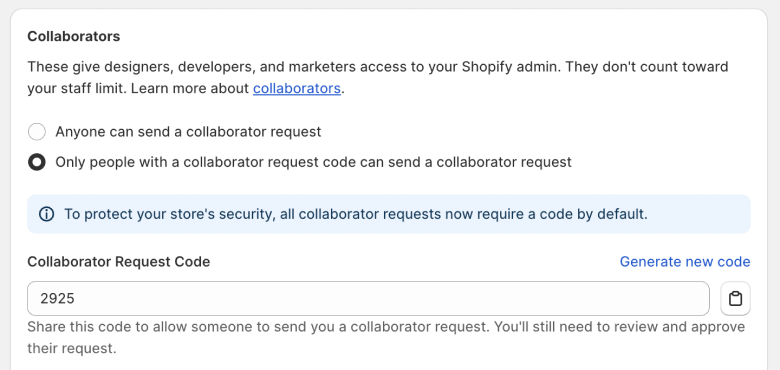
Scroll down to the Collaborators section.
Find your 4-digit collaborator code and copy it using the icon next to it.
Share this code with the SARAL success or support team

Approve the Access Request:
Once you've shared the code, our tech team will send an access request to your email.
You will need to approve the request for SARAL to gain access to your store (and we’ll take care of the rest!)
Still have questions?
Reach out anytime via the support chat at the bottom-right corner of your dashboard, or email us at [email protected]. We’re happy to assist!