There may be times when you notice differences in commission amounts shown across:
The Payments Section
The Influencer Dashboard
The Influencer Performance Page
This guide explains why these discrepancies happen and what to communicate to influencers if they ask about them.
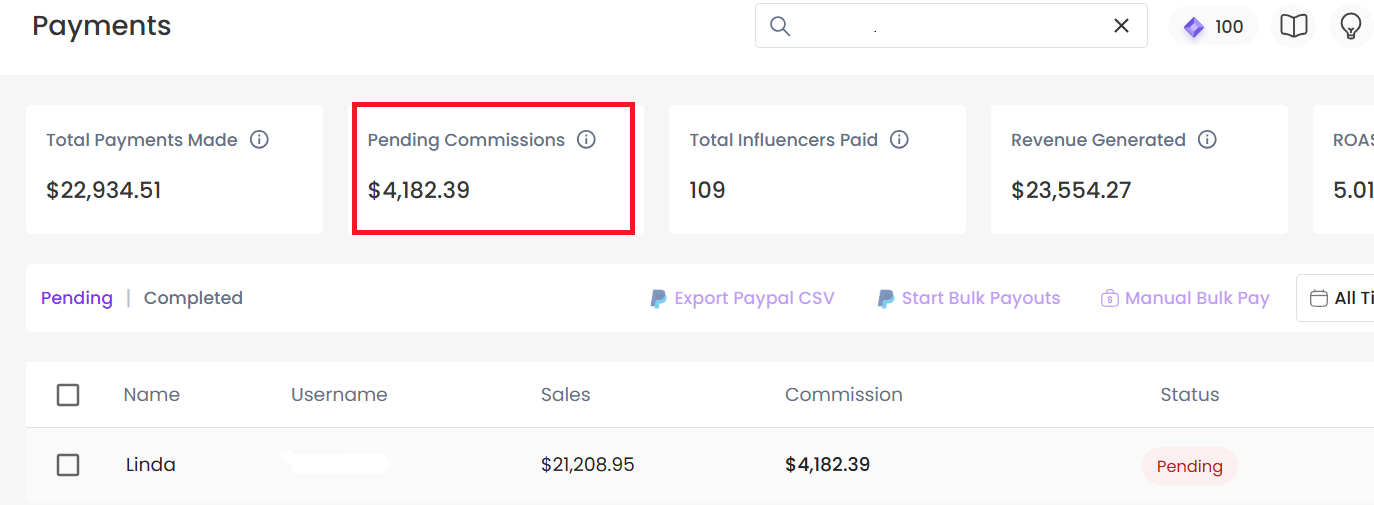
You normally go to Payments pending section to pay influencers. The commission shown on this screen reflects pending payments only meaning commissions that are currently unpaid.
In other words, this section shows what is still due.
As influencers are paid, the pending amount decreases. This can make the commission value appear lower over time.
It does not reflect lifetime earnings. It only tracks what still needs to be paid.
For example:
An influencer may have an all-time pending commission of $4,182.39, which simply means this is the total amount that is still unpaid across all time.
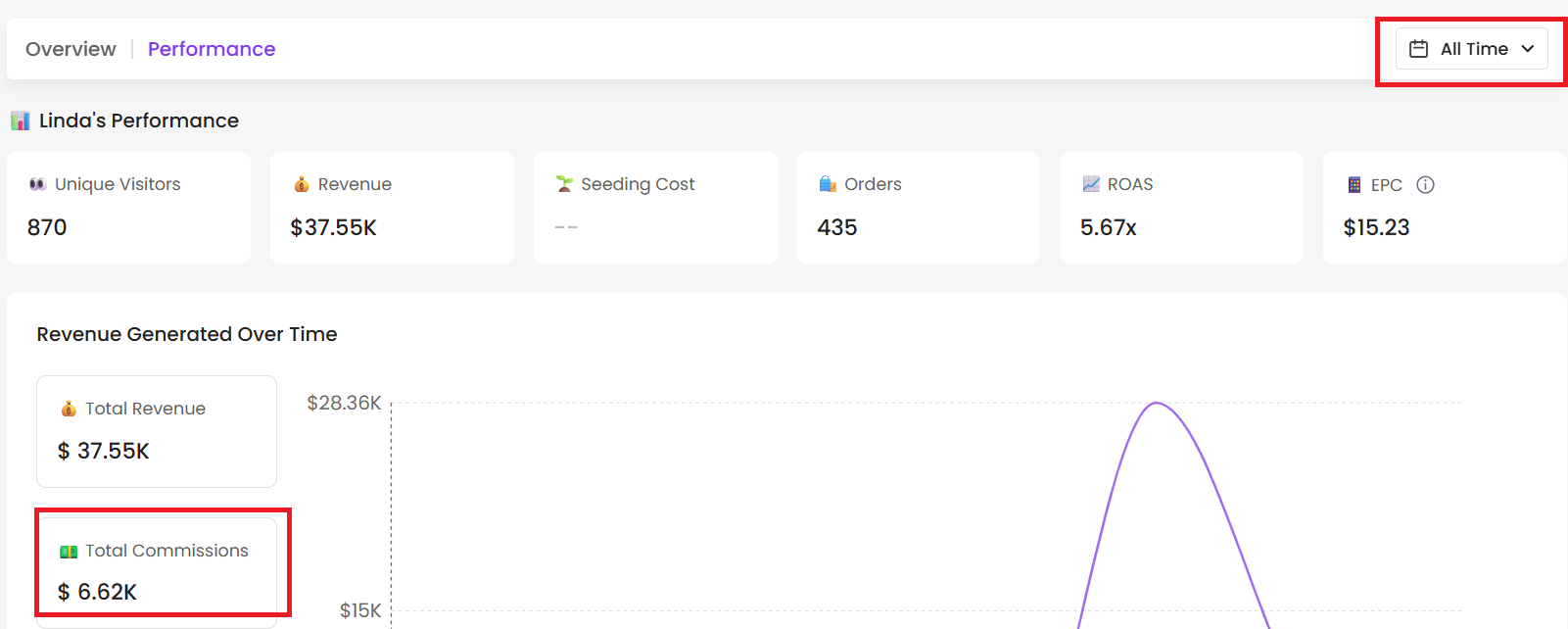
Now let’s take a look at her commissions on the Performance Page, using the same All-Time date range.
Here, her commissions show $6.62K.
Unlike the Payments section, the Performance Page and the Influencer Dashboard both display all-time commissions basically, their lifetime earnings.

Includes both paid and pending commissions.
Does not decrease when payouts are made.
Essentially, it shows their total earned commission.
The idea here is simple: influencers can see how much they’ve made with you overall. And the bigger that number, the happier they’ll be! 😄
Since the Dashboard and Payments sections track different things, it’s totally normal for the numbers to be different.
Now, why do commissions look different in Payments? Let’s break down the main reasons and what to tell your influencers.
In GoAffpro, the following are considered rejected:
Unsuccessful payments
Returned orders
Orders not delivered
Canceled
Refunds
Even if an order was initially approved, if any of these things happen afterward, SARAL will deduct the commission from the current payout.
Example:
An order is canceled or refunded after a commission has already been generated or paid. The affected commission will be adjusted in the next payout cycle.
This adjustment may temporarily cause differences between the influencer’s dashboard and the Payments tab.
Next step for you: Check GoAffPro for rejected orders to confirm.
Sometimes, an order may be placed in one month but approved in the next. Orders are automatically approved in GoAffpro. Once approved, the commission is immediately attributed to the influencer.
Example:
Order placed in December → counted in revenue
Approved in January → counted in commissions
This can cause temporary differences when viewing reports for a specific month.
Commissions that have already been paid won’t appear in the Pending tab, which reduces the amount shown in Payments.
If the brand has not paid the influencer for certain orders yet:
Those commissions will show as Pending
This can increase the pending commission value
Commissions are calculated as a percentage of the net revenue (after discounts, returns, all other deductions)
Suppose an order has a 10% commission:
Gross Revenue: $1000
Discounts/Returns: $100
Net Revenue = $1000 - $100 = $900
Commission = 10% of $900 = $90
To see an influencer’s total commissions or lifetime earnings, always check the Performance tab or the Dashboard. The Payments tab is best for tracking due commissions only.
If you notice differences between SARAL and GoAffPro, here’s what to do:
Check the pending Approval section in GoAffPro - some orders may still be awaiting for approval. Be sure to check any rejected orders as well.
Review individual order commissions - commissions that have already been paid won’t show up in the pending tab.
Reach out anytime with our helpful Support team using the button at the bottom-right corner of your dashboard, or email us at [email protected].