
Before PULSE can start tracking your content, you'll need to connect it to your brand's Instagram account through Meta. This is a one-time setup step.
Connecting PULSE to Your Brand
Before PULSE can start tracking your content, you'll need to connect it to your brand's Instagram account through Meta.
Click Start Listening on PULSE's connect screen.
Log in to Meta using an account with admin access to your brand's Facebook Page.
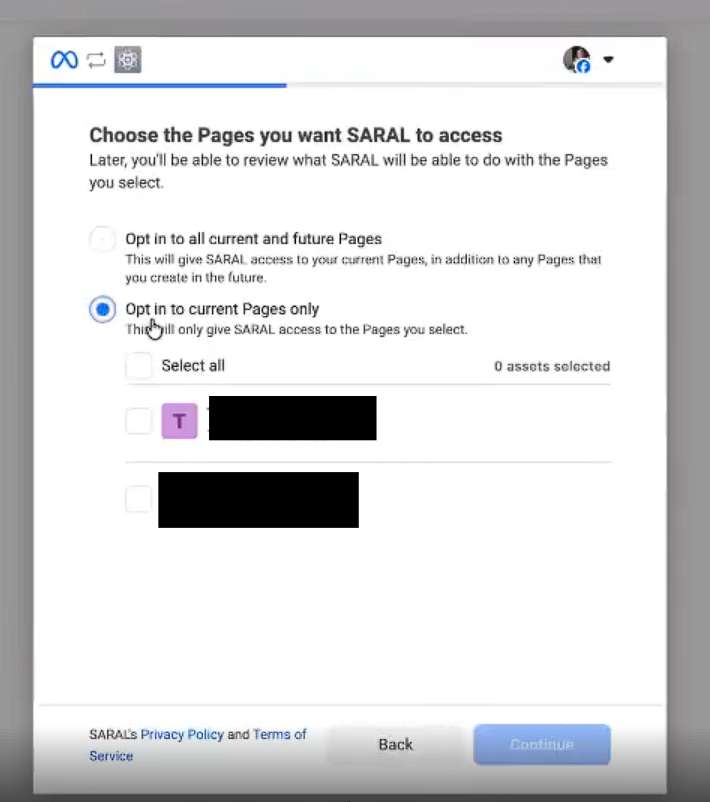
On the permissions screen, select Opt in to current Pages only, then choose the brand Page you're an admin on.
If you're prompted on a second screen for Instagram, select the same brand Page you chose in the previous step, then click Save.
Once connected, PULSE takes a couple of minutes to pull in your existing posts and will automatically showcase all tracked content.

Still need help?
Reach out anytime to our Support team using the button at the bottom-right corner of your dashboard, or email us at [email protected].