
In the article “How to Review and Approve Influencer Content”, we covered how to review and approve submissions directly from an influencer’s profile.
This article will show you how to review and approve ALL content submissions making it easier to manage multiple creators and approve content in bulk.
Here’s how:
Go to SARAL Home
Scroll down to the Content Submissions section.
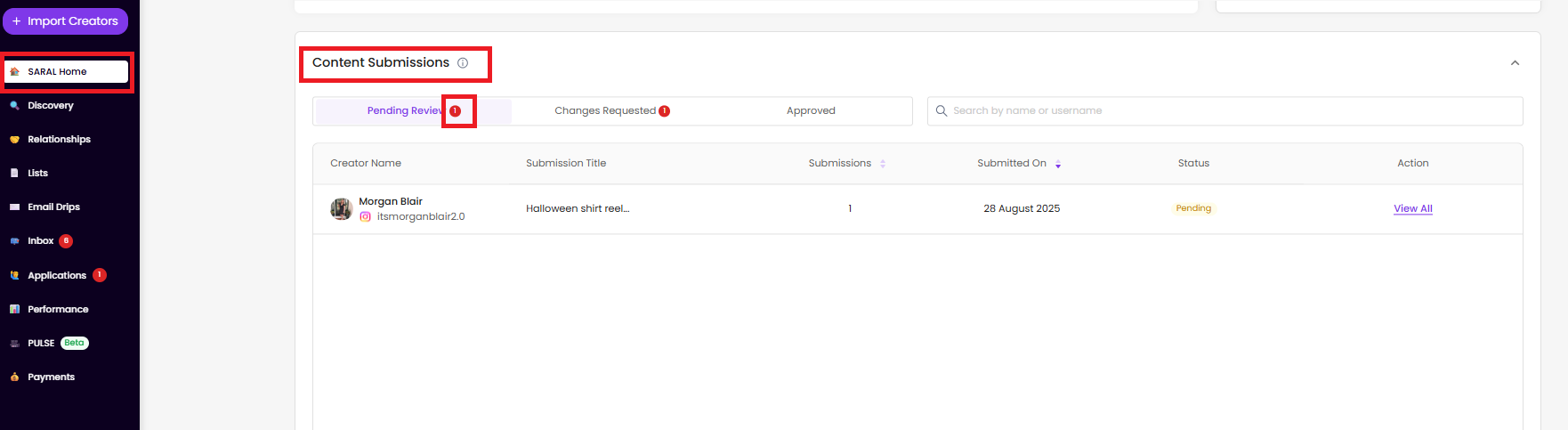
What You Can Do from the Dashboard:
View and manage all submitted content types (images, videos, or links)
Request changes or provide feedback
Approve content
Search by name or username to quickly locate a creator’s submissions
View key submission details like submission dates and total number of submissions
With everything in one place, reviewing, approving, and managing creator submissions is simple, efficient, and scalable.
Still have questions?
Reach out anytime via the support chat at the bottom-right corner of your dashboard, or email us at [email protected]. We’re happy to assist!