Spark Ads let you run ads using a creator's TikTok content, posted from their account. In PULSE, it works the same way as Partnership Ads on Meta: connect your ad account once, request access from a creator, then create and track ads in one place.
For the Meta version, see our guide on Partnership Ads.
Run Partnership Ads via PULSE
How to request partnership ad access from a creator, build and publish an ad using their content, and track ad performance, all from inside PULSE.
You need two things on TikTok for Business:
You're an admin of your TikTok Business Center
Your ad account is inside that Business Center

Click Spark Ads in the sidebar.
Click Connect TikTok Ads and sign in with TikTok for Business.
Pick the Business Center you want to use.
Once connected, you land on the Partnerships tab.
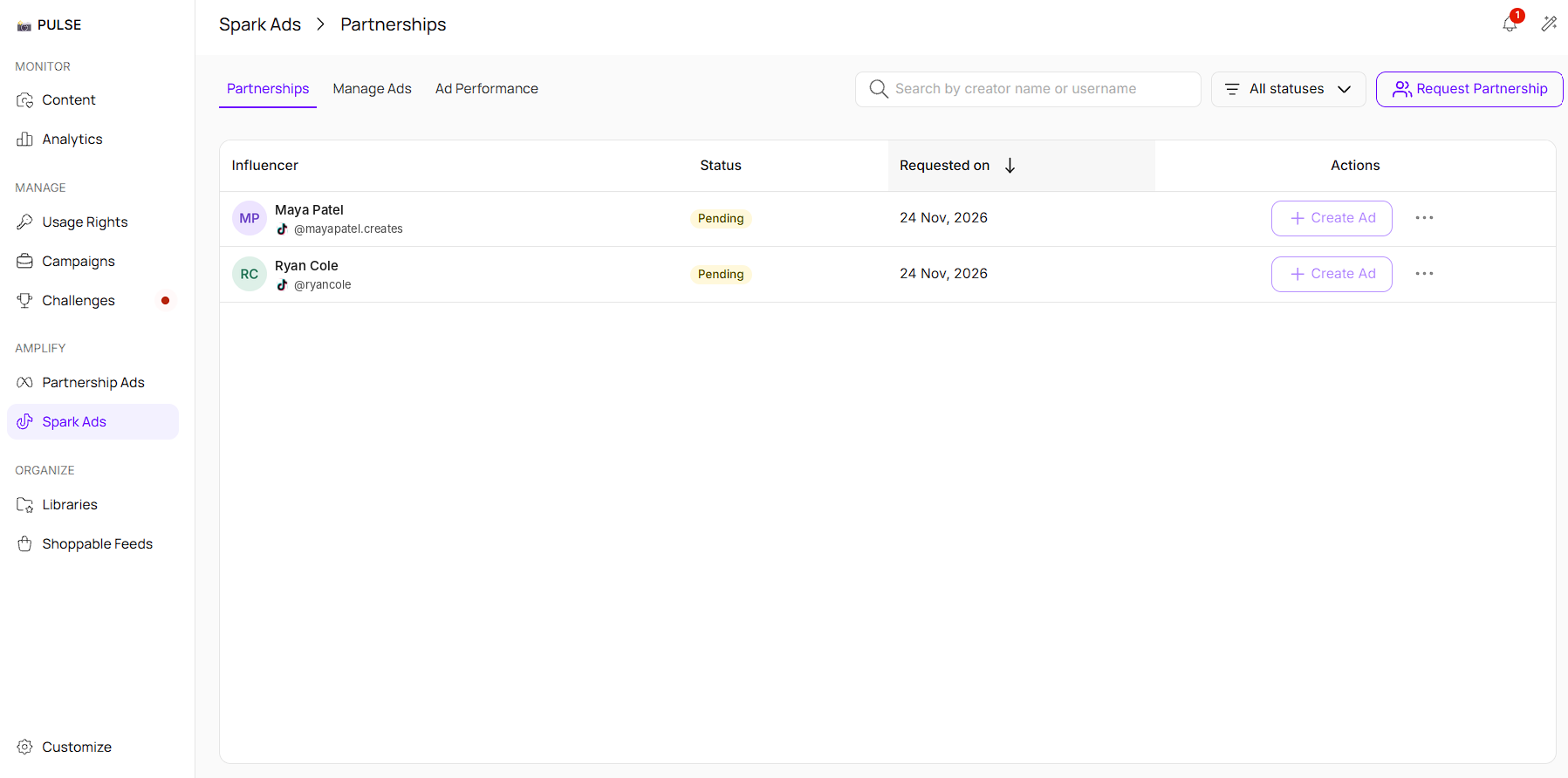
You can send a request from two places:
From a post: On the Content page, open a TikTok post, click Request Rights, then click Request next to Spark Ads.
From the Partnerships tab: Search for any TikTok username, including creators who have never tagged you, and click Request.
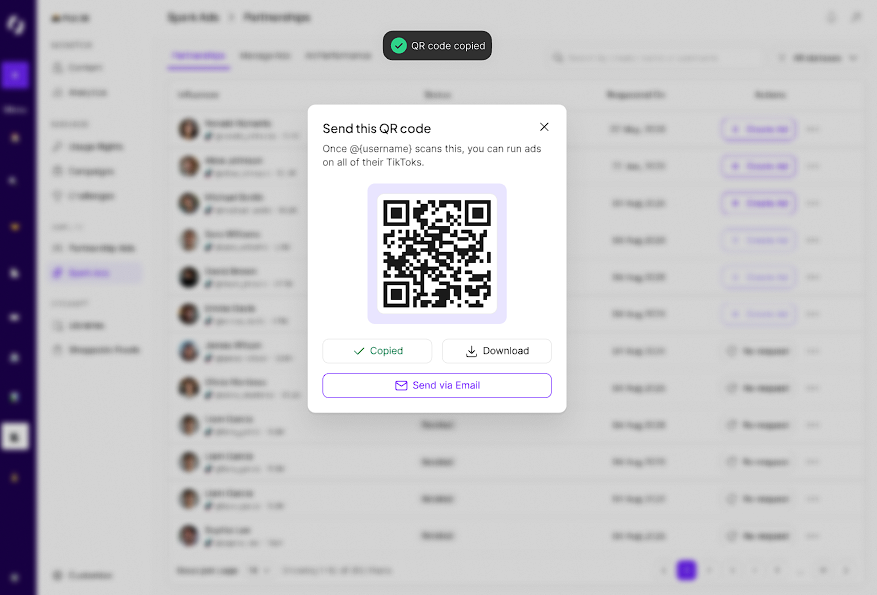
Both open a QR code. This code asks the creator for permission to run ads on their existing posts and to publish new videos to their account as ads only. Those videos won't appear on their profile.
Share the QR code in any of three ways:
Copy QR code to paste it into a DM or chat
Download QR code to save it as an image
Email to send it with scan instructions. If you already have the creator's email saved in SARAL, it's filled in for you. If not, type it in.
The creator approves by scanning the QR code in the TikTok app. If you're sending the code yourself, share these steps with them:
Open TikTok and go to Profile.
Tap the menu at the top right, then Your QR code.
Tap the scan icon at the top right.
Scan the code, or tap Album and pick the saved image.
Approve the request.
Every request shows up in the Partnerships tab with one of three statuses:
Pending: Sent but not approved yet. Use the ellipsis menu to view the QR code again or regenerate it.
Active: Approved. You can create ads with this creator.
Revoked: The creator has revoked access.
Click Create Ad on any Active creator and work through the steps:
Pick the TikTok ad account the ad will run from.
Pick an existing Sales campaign.
Pick an existing ad group. Budget, schedule and targeting come from this ad group.
Ad delivery: Fill in the ad details.
Ad partner: The Active creator.
Ad name
Ad setup: Choose Use existing post to pick one of the creator's posts, or Upload media to upload a new video and write a caption.
Call to action and Destination URL are required.
Review: Check everything and click Publish Ad.
Your ad is created as active and starts spending once TikTok approves it.
AdShare lets you share a cut of the ad's results with the creator. It works the same as in [Partnership Ads].
Turn on the AdShare toggle in the Ad delivery step, then set:
Share based on: Ad spend, Revenue (GMV), or Pay Per Sale
Share %
Lifetime cap (optional)
Ads with AdShare show an AdShare tag in Manage Ads. Creators see their payouts on their dashboard and get the same payout email as Partnership Ads.
Still need help? Reach out anytime to our Support team using the button at the bottom-right corner of your dashboard, or email us at [email protected]